PennWest California announces the 11th Annual Strike a Spark Conference on research,
scholarship, creative activity, and application. The theme for this year’s conference,
which will take place on Wednesday April 15, 2026, 9:00 a.m. – 3:30 p.m., is The Power of Experience.
In person and online presentations from all disciplines are welcome. This could be
work from an individual project, class project, capstone experience or senior/graduate
thesis.
2026 Strike a Spark Awards
Creative Works
First Place: Alexis Dombrowsky - "Deciphering and Recontextualizing Image and Text
in Mesoamerican Art"
Second Place: Jessica McCann - "Fragmented Identity"
Third Place: Nikkisha Thompson - "Bringing Stories to Life: Prop Design for Into the
Woods"
Oral Presentations
First Place: Daniel Harris - "Investigating Graft - Induced Genetic Change in Arabidopsis
Thaliana and Other Dicots"
Second Place: Jordan Wiedman - "What Role Do "Psychological Loopholes' Have in the
Fraudulent Behaviors of Religious Leaders?"
Third Place: M'ayuk-Nkongho Ketchen-Obi - "Music and Mental Health"
Posters
Morning Session
Independent Projects:
First Place: Lauren Walker, Hannah Schleicher - "Effects of Rabies Vaccine Exposure
on Canine Cancer of Cell Behavior"
Second Place: Sophia Ito, August Cox - "Experimental Investigation of the Band Gap
Energy of Polyaniline composties with TiO2, Graphene Oxide, and Reduced Graphene Oxide
via Diffuse Reflectance Spectroscopy"
Third Place: Shawn Gallagher - "Typing in Thin Air: An IMU-Driven Interface for Distant
Display Text Input"
Class Projects:
First Place: Caroline Mercer - "Treatment of Premenstrual Syndrome (PMS) and Premenstrual
Dysphoric (PMDD)"
Second Place: Meja Haakansson - "The Female ACL: Menstrual Cysle Phases and Hormonal
Contaceptives Influence on Injury Risk and ACL Laxity"
Third Place: Chase Shuback - "Effectiveness of Treatment and Prevention Strategies
for Traumatic Brain Injuries in Athletes"
Afternoon Session
Independent Projects:
First Place: Layla Koon - "Green Chemistry Extraction and Kinematic Investigation
of Aquatic Biomass for Biodiesel Production"
Second Place: Nikki Akor - "Co-Selection of Antibiotic and Metal Resistant Bacteria
from Passive Abandoned Mine Drainage Systems"
Ari Kaser - "The Use of Bacteriophages Against Antibiotic Resistant Soil Bacteria"
Honorable Mention: Abilene DeNunzio - "TDR1 Experssion in Water ad a Bioindicator
of Pollution"
Class Projects:
First Place: Daniel Harris - "DNA Polymerase Beta: A Literature Review"
Second Place: Sarah Stygler - "FRET Analysis of the CFTR N1303K Misfolding Region:
A Proof-of-Concept Study"
Third Place: Sarah Stygler, Michael Othites - "Gating Mechanisms and Therapeutic
Modulation of the N1303K Mutation in CFTR: A Critical Review"
Honorable Mention: Donte Brabham- "Anabolic Steriods in Sports"
Create an Abstract
To participate in the event, the first step is to submit an abstract. An abstract is a short summary of the work you want to present (200 words or less).
Its aim is to interest conference participants in your presentation. Abstracts are
due by midnight, Friday, March 20, 2026.
Abstract Submission Guidelines
If you want to present your work at a regional or national conference, you will most
likely be asked to submit an abstract as part of the application process. An abstract
is essentially a brief summary of your work, which should make a reader want to see
your presentation. The abstract you write should be short and understandable to a
general (campus-wide) audience:
Have a clear title
Be concise (the abstract should be 200 words or less in length)
If possible, avoid trade names, acronyms, abbreviations, or symbols (you would need
to explain them, and that takes too many words)
The required font for the abstract is Times New Roman, 12 point.
Complete the online proposal submission form to submit your abstract.
Deadline for submissions is March 20, 2026. All proposals must be submitted by midnight,
EST to be considered.
How to Write an Abstract
If you have never written an abstract before, here are the basic components of an
abstract in any discipline (this is adapted from the University of Kentucky guidelines):
Motivation/research question: What motivated you to start this project? Why is it of interest? Why should we care
about this problem? What practical, scientific, theoretical or artistic gap is your
research filling? (e.g. does your research create new knowledge or involve a new idea,
method, process or product?)
Methods/approach: What did you actually do to get your results, or what do you intend to do? (e.g.
analyzed three research articles, completed a series of watercolors, interviewed 25
social work students, monitored water quality at three lakes)
Results/product: What did you learn/create, or what do you expect to learn/create once your project
is completed?
Conclusion/implications: What are the larger themes or implications of your work? (e.g. what is the “big
picture” take-home message from your presentation?) How does this relate to the research
question or knowledge/artistic gap you identified in step 1? These can be expected
conclusions if the project is still in progress.
The emphasis given to each of these four abstract components can vary by subject.
It may help to look at some examples from last year’s conference, at the end of the
page. We also recommend composing your abstract in a word processing program (such
as Microsoft Word), so that you can proof read it, then pasting your proposal into
the text box provided in the online submission form.
Abstract Examples
Abstract Example – Creative Works
Throughout my college career I have been researching social and environmental issues
surrounding food for classes and independently. After several years of making functional
pottery, it seemed natural to combine these interests. This set of six plates features
hand drawn scenes in black underglaze on white stoneware portraying issues from the
food industry. I have chosen to highlight subjects touching on immigration, biodiversity,
and our relationship with what we consider edible. The food industry in the United
States is complex and controversial. My goal with creating Food Plates is not to convey
a specific viewpoint, but to serve as a reminder of unseen things that are occurring
every day before food becomes available to us.
Abstract Example – Poster (Social work)
Prejudicial attitudes are a pervasive and complicated problem in modern America. Social
service agents often fill the gap of compassion that can be created by an unwelcoming
community. When social service agents are battling prejudicial attitudes of their
own, care can be compromised, and clients will ultimately suffer. Research is lacking
on the ways in which rearing environments impact attitude development; social service
students of a public, rural university in southwestern Pennsylvania were asked to
complete a survey in order for the researcher to evaluate whether there might be any
statistically significant connections between one’s upbringing and their attitudes
in the social services setting. The goal of this research was to examine these connections
and ultimately find ways to address them in social service (more specifically, social
work) education.
Abstract Example – Poster (Anthropology)
Forensic anthropology relies on the skeletal material that is retrieved during the
recovery of remains. The more intact the skeleton, the easier the job is, just as
the more damaged the remains are, the harder the job becomes. One of the most fragile
parts of the skeleton, the skull, tends to be used for sex estimation when the os
coxae, the pelvis, is not present. In cases where the skull and the os coxae are not
present, alternative sex estimations must be used. This study looks at the application
of alternative sex estimation methods on a box of commingled archaeological remains.
The remains are Monongahela, which was a southwest Pennsylvania Native American tribe
and were excavated at the Campbell Farm Site. Methods were tested on a sample of previously
sexed individuals within the population and then applied to the commingled remains
to determine accuracy of the methods on the specific population.
To submit an abstract, please choose one of the following presentation options:
Oral presentation: Oral presentations involve giving a short talk to an audience that describes your
work (research, scholarship, or creative process). These are usually accompanied by
slides (e.g. PowerPoint or Prezi slides), which provide a visual aid to help your
audience understand your findings. Presentations will be limited to 10 minutes, with
time for questions.
Poster presentation: Posters are a concise visual summary of your work (research, scholarship, or creative
process), typically containing brief text elements mixed with photographs, tables,
graphs, pictures). You will create one large (48” x 36”) poster that we will print
for you. Presenting your poster is less formal; it’s a conversation with individual
people or small groups. This is a great place to present small projects or work in
progress and get feedback for future presentations.
Creative works exhibit: (one or more pieces of art or design, or a product developed through a creative process)
Creative works include, but are not limited to painting, drawing, photography, sculpture,
pottery, jewelry, costume design, lighting display, graphic design, robots. Presenting
your creative work is less formal; it’s a conversation with individual people or small
groups.
You have four options for presenting in-person at the Convocation Center on Wednesday,
April 16. You can give an oral or paper presentation about your work (research, scholarship,
or creative process), create and print a poster about your work (research, scholarship,
or creative process), display your creative work in the Convocation Center, or give
a performance of a short creative piece. If you cannot present in person on April
15, record a 5-10 minute video in which you present your research, scholarship, or
creative process, or show and discuss your creative works.
General Presentation Guidelines
In designing an effective poster, first think about what you want viewers to learn
from your presentation. What will they need to know in order to understand your work?
You will need to:
Provide some context for your work. What is the problem or central question you are
addressing, and why is it important? (Why should viewers care about your work?) What
background information does a viewer need to know to understand your work?
Explain what you did to get your results.
State what you learned/created during your project. You project does not have to be
complete – this is what you have learned so far.
Consider the larger themes or implications of your work (e.g. what is the “big picture”
take-home message from your presentation?). How does this relate to the problem or
question you described in your background section? How does your work fit with what
we already know about this topic?
Oral Presentation Guidelines
Oral presentation should be approximately 10-12 minutes in length, and can be individual
or group presentations. There will be an additional 2-3 minutes at the end of each
presentation to answer any questions the audience may have. All rooms are equipped
with a computer and video projection system for displaying PowerPoint/Prezi presentations.
Poster Presentation Guidelines
Creating a Poster
The maximum poster size is 48 inches wide by 36 inches tall. You can use software like PowerPoint to create a single page poster. It is a good
idea to start by setting the correct dimensions for your poster. To set the correct
dimensions for your poster in PowerPoint:
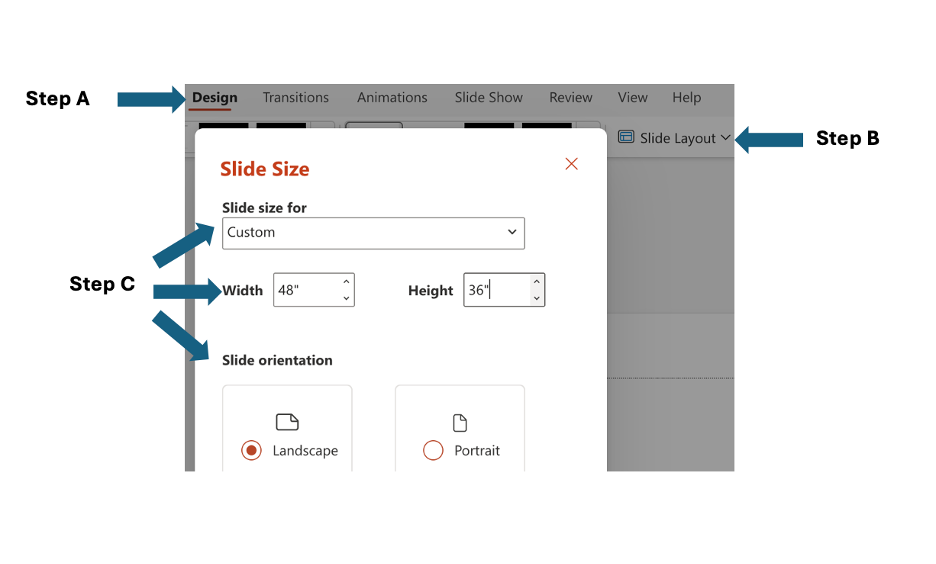
Click on the ‘Design’ tab in PowerPoint.
A menu bar will appear with a ‘Slide Size’ tab. Click on the down arrow (▼) next
to ‘Slide Size’ to access the dropdown menu, then choose ‘Custom Slide Size…’.
In the dialog box that appears, select Slide size for: Custom, Width: 48”, Height:36”, and Slide orientation: Landscape, as shown in the screenshot below.
Layout
The title should be short, clear, informative and large (if printed, viewable from
8ft away, 80 pt or bigger). This should be followed by the names of the presenters
(at least 60 pt).
Split your poster up into a series of sections with clear headings.
Make sure the flow of information is logical and easy to follow. The headings you
use can help you to guide readers through your poster, and can help to convey your
findings.
Make sure your layout is consistent and neat.
Don’t be afraid to leave some blank space, it helps to organize and define your sections.
Create a balance between visuals and text: posters are a visual medium, so you don’t
want to have too much text.
Download a PowerPoint template for your poster presentation. Choose the format that
works best for you, or modify one of the templates to suit your needs.
Text should be short and to the point. To minimize the amount of text you use, consider
keeping any text elements to 50 words or less.
Consider using bullets, instead of paragraphs.
Make text large! All text should be at least 24 pt (at least 36 pt for headings).
When you make a statement or include a statistic, cite the source, otherwise readers
will lose confidence in you as a source of information.
Visuals
Good graphics are the key to an effective poster.
Use simple, relevant images and graphs to illustrate and enhance your poster. Make
sure the images you choose are freely available to share (e.g. from creative commons).
Photos help to illustrate your work and can help convey your message to viewers.
Consider whether you can use an image or graph, instead of text, to communicate a
concept/relationship/idea.
Use graphics to attract attention.
If you have only a few illustrations, make them big!
PennWest California will cover the cost of printing posters for the April 15 Strike
a Spark Conference.
Please be sure the file is in pdf format. (i.e. cut the reference to PowerPoint -
we have been advised to have students submit as pdf only for offsite printing).All posters must be submitted for printing before midnight Wednesday, April 1.
Follow these instructions to ensure efficient and accurate printing of your poster.
Create your poster – See Poster Presentation Guidelines section for information on
how to set the correct dimensions for your poster, advice on the layout of your poster,
and poster templates. Be certain that you set the appropriate size for your poster!
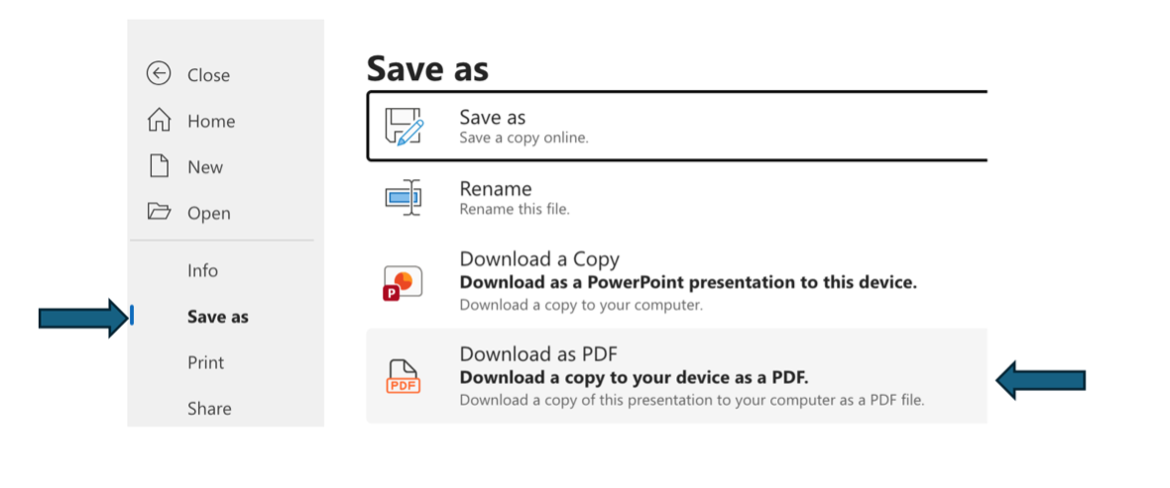
When your poster is laid out to your satisfaction, save it as a pdf file. To do this
in PowerPoint, click on the “File” tab in the upper left of the PowerPoint screen,
choose “Save as”, then “Download as a pdf”, as shown in the screenshot below.
Submit it for printing using the link below. Please be sure the file is in pdf or
PowerPoint format. SharePoint files cannot be accessed for printing!
If you are not presenting in person (live or via Zoom) on April 16th, you will need
to record a video of your presentation. This video will be available on the Strike
a Spark website during the conference. Here are the steps you'll need to follow to
make and submit your recording.
Instructions for recording a PowerPoint lecture or poster using Zoom
If you are using different software to make your presentation, follow the Zoom instructions
below and use your software in place of Microsoft PowerPoint
Make a large format poster or slide show presentation using PowerPoint. Please visit
the Presentation Guidelines page for information on how to prepare your presentation.
Go to D2L and log in to Zoom (to do this go to communications tab and choose Zoom
Portal log in from the dropdown menu).
Open up your PowerPoint presentation.
In Zoom, click on the green “Share Screen” button at the bottom of the zoom window.
Choose Microsoft PowerPoint from the options you're given, then click on the blue
share button.
In PowerPoint, open your presentation to its maximum size. To do this, go to the View
dropdown menu and choose "Slide Show" or go to the Slide Show drop down menu and choose
"Play from Start" or click the Slide Show icon at the bottom of the PowerPoint.
When you are ready to start your presentation, click on the three dots (... ) labeled
"More " at the top right, then select "Record” and “Record to this computer" from
the dropdown menu.
This will generate a file that will be saved on your computer. Please save the recording
as an mp4 (.mp4) file.
Submitting your presentation
Once you have recorded your presentation, please save it as an mp4 file (.mp4) and
use one of the following file name formats.
your full name-poster (if your presentation is in the category “Poster”) your full name-oral (if your presentation is in the category “Oral/Paper”) your full name-creative (if your presentation is in the category “Creative Works”)
Here is an example: marksmith-creative.MP4
Send your presentation to your faculty sponsor to review, and ask them to sign your
faculty sponsor form.
To submit your presentation and your signed faculty sponsor form, use the form link
below.
We value your feedback and would love to hear about your experience at the Student
Research/Creative Works Conference. Please take a few minutes to complete our survey.
Your insights will help us make future conferences even better!